Live transcript
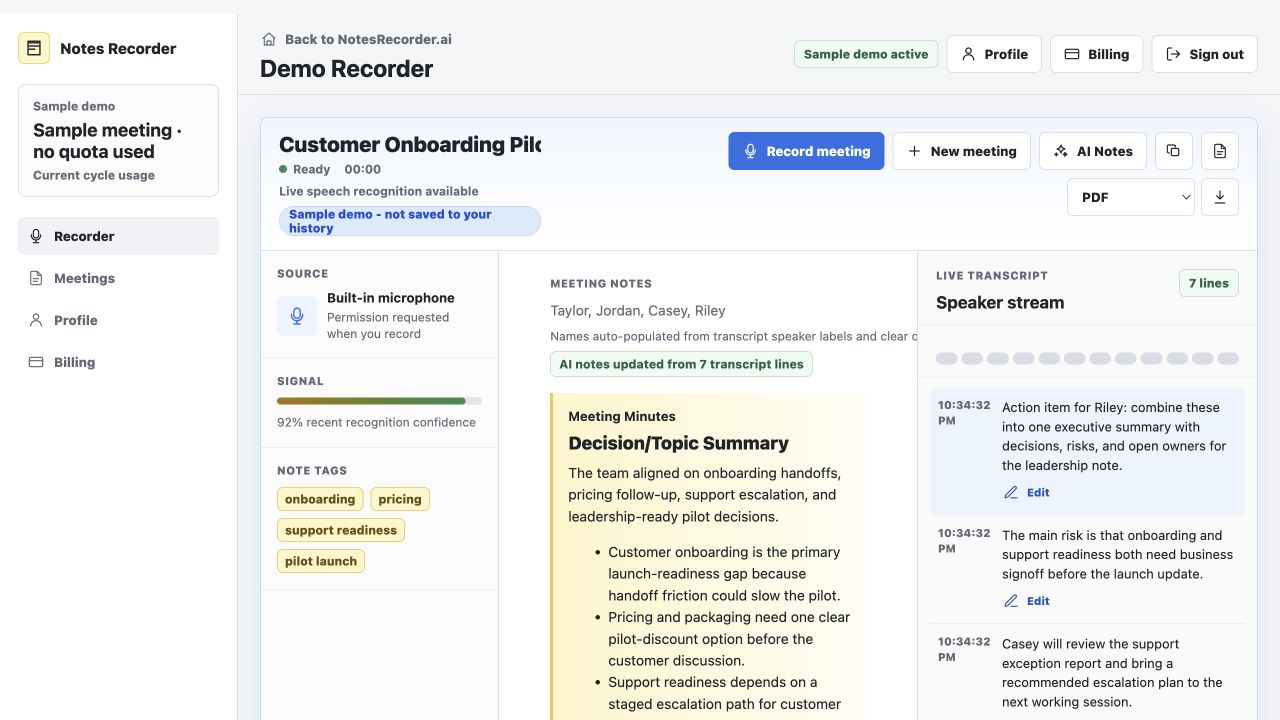
Speech that reaches the selected device microphone appears as a running transcript while the meeting continues.
Browser-based · microphone capture · no meeting bot
Open Notes Recorder in your browser, grant microphone access, and turn an audible conversation into a live transcript, organized summaries, decisions, risks, and action items while the meeting is still happening.
The sample demo needs no account and does not save a meeting. Lite includes 180 recording minutes per month; payment is required before recording.
What the product creates
Notes Recorder keeps the source conversation separate from the organized output so you can verify and copy each one, save both, and export the notes.
Speech that reaches the selected device microphone appears as a running transcript while the meeting continues.
The conversation becomes topic sections with a running summary, decisions, risks, and concise action items.
Keep the conversation beside the organized notes so you can verify names, owners, dates, decisions, and risks before sharing a follow-up.
Capture method and limits
Notes Recorder does not join a call and does not directly capture system or browser-tab audio. It records what your chosen device microphone can hear, so the clearest fit is an in-person meeting, a speakerphone call, or an online meeting played through speakers. If you must wear headphones or need automatic calendar/CRM integrations, another tool may fit better today.
Straightforward monthly pricing
Every plan includes live transcription, AI meeting minutes, saved history, transcript review, separate copy actions, and notes export in Text, CSV, Word-compatible, and print-ready PDF formats.
$5/month
180 recording minutes
For occasional meetings and solo follow-up.
Choose Lite$19/month
1,800 recording minutes
For weekly meetings and recurring follow-up.
Choose Starter$39/month
3,600 recording minutes
For heavier customer, team, and planning calendars.
Choose ProBuilt for the person who owns the follow-up
Akshay Zimare built Notes Recorder from years of technology leadership, technical program management, PMO, product, systems, and strategy work—roles where the value of a meeting is often determined by the clarity of the next action.
The product is intentionally narrow: open a web page, record an authorized conversation, keep the source visible, and leave with an editable follow-up.
Review the transcript instead of accepting a summary with no visible evidence.
No bot participant, desktop download, browser extension, or calendar connection is required.
The AI is instructed to include decisions, risks, owners, and due dates only when the conversation supports them; human review is still required.
Useful before you buy
These pages explain the product, its limits, and how to compare it with other approaches without pretending one tool is right for everyone.
Guide
When a browser-and-microphone workflow is a better fit than an auto-joining meeting bot.
Template
A copyable structure for decisions, risks, action items, owners, and due dates.
Buyer guide
A transparent checklist covering capture, verification, privacy, workflow, and price.
Fact sheet
Current pricing, features, limitations, data flow, positioning, and last-verified date.
Common questions
No. Notes Recorder runs in your browser and records audio that reaches the microphone after you grant permission.
Not reliably. It does not directly capture system audio. For online calls, use audible speakers or choose a tool designed for system-audio capture.
No. Transcripts and AI-written notes can be incomplete or wrong. Review decisions, owners, dates, and action items against the visible transcript.
Yes. Recording and consent rules vary by location, workplace, and context. Record only conversations you are authorized to record.
No public free trial is available as of July 18, 2026. Lite costs $5 per month and includes 180 recording minutes.
Signed-in customers can save and revisit their own account-scoped meeting history, transcripts, rough notes, and exports.
Notes Recorder does not sell customer information or use meeting content for advertising. Recording still requires participant permission and human review of AI output.